Linux - Find files having 0777 permission level!

- Posted in Linux/Unix by

A 0777 permission means -rwxrwxrwx for files & drwxrwxrwx for folders. Look it up here for more details.

Again, I will not try and go on about how security matters and how the incorrect file permission makes your Linux system vulnerable.

A file with permission 0777 is open to everyone for read and write. Any user logged in to system can write to this file. Which can be harmful for your system.

In some conditions you do require 0777 permissions, like log files. However, in most cases it is best to not have this.

The easiest way to locate all files having 0777 permission is:

find /path/to/dir -perm 777

The -perm command line parameter is used with the find command to search files based on permissions. You can use any permission instead of 777 to find files with that permission details only.

For example to search all files with permission 0777 under the logged in user home directory, type:

find $HOME -perm 777

The above command will search all the files & directories with permission 777 under the specified directory.

But if you don’t want to include directories in this list. Define the type with -type in command line parameter as below.

This will search only files with permission 777 under the /var/www directory.

find /var/www -perm 777 -type f

To search for directories only, type:

find /var/www -perm 777 -type d

Linux - Change Permissions Recursively

- Posted in Linux/Unix by

I will not go long, but never, never, ever set file permissions to 0777 on production servers (or for that matter any server). This leads to WORLD writable and leads to security issues, including take-over/spamming and what not.

Always keep the file and directory permissions to minimal. Many applications frameworks request/suggest to keep permissions for all directories to 0755, and all files to 0644.

So, let us try that out and do it smartly this time.

Change Permissions Recursively

Change directory with cd command to the desired location under which you need all directories to have the permission level to 0755, and all files to 0644.

cd /home/user/public_html

Then use the first command below to chmod 0755 for all directories and sub directories. The second command will change all the files permission to 0644 (chmod 0644) under the directory tree.

find . -type d -exec chmod 0755 {} ; find . -type f -exec chmod 0644 {} ;

You can also change permission using xargs command to do this quickly.

find . -type d -print0 | xargs -0 chmod 755
find . -type f -print0 | xargs -0 chmod 644

Here the directory permission 0755 is similar to “rwxr-xr-x” and the file permission 0644 is equal to “rw-r–r–“.

Change Permission for Specific files

Instead of changing permission for all files, you can also target the specific files with similar extensions. For example, if you have a PHP application on your server, & you don’t want to allow others to execute the PHP files, then use the following command to chmod 0640 all of those files with php extension:

find . -type f -name "*.php" -exec chmod 0640 {} ;

The file permission 0640 will restrict others with no permissions. This adds an extra layer of security under permissions.

Setting self hosting at home & related horrorsssss

- Posted in Club Frenzy by

So, this is what I call horrrrrorrr of horrorrsss.. Don't trust me? Try it yourself, when you are not a tech-funkiee.

backbone-shh

So, it all started with my mind going open source, few years back. I have been trying hard, but with limited resources, finance being a hurdle and more, I started saving as much to as little as possible, cutting down on a lot of my expenses. It took me around 4 years to gather money up so that I could go for a couple of domains and get them up for the next 10 years at least, while making sure, I save enough for the next 10, and next 10 and so on.

Now, while I was saving money, I was in parallel lookigng for guides and reading through to find out what all are needed. Domain [check], DNS [check], certificates & privacy [check], hosting [woah... no check].

Now, I was aware we needed apache2, virtual hosts, nginx and whatsh** for a lot and all of this, and not to forget, languages (not spoken, but written), html, php, and .....

Anyways, not dragging this one out here, and I will speak of it on my other post in a few days time, back to this post.

For the last 3 weeks, I am kind of glued to my laptop.

HP Notebook from 2014 build year, Li-on battery (heats like hell), i3-5005U CPU, L2 cache, 16GB RAM, 1TB HDD (formatted and am running MX 21.3 since 3 days now), 248GB SSD (currently running W11, fully modified, no cr**), KVM disabled, Intel 5500 Graphics, and the long list. You get the gist, I am sure.

What has been eating me is this: I paid for unlimited (even though shared hosting), and now everything has been limited, badly. I can run very limited stuff, and that too if one job runs, and has say number of processes, the system automatically gets overrun and a lot of other things stop, ruined, messed up.

Anyways, so, I went over to internet, and searched and searched, and searched. Was getting very difficult to find me resources which cater to either something in recent times, and something which can at least give me basic idea and steps to run things.

I found few sites, few blog posts, few even detailed guides, but 90% of those were related either to only Windows based hosting, and or Ubuntu/Debian Server based hosting. There were many CentOS/Rhel etc based as well, but they were so aged, that even older generation would call it the era of eons...

Now, while I had in mind what I needed, I am not a technical person at core. I understand concepts, I can read and probably modify codes to make things work, but if you get tooooo technical, I will either ask questions, or might jump to my own understanding, thereby messing it up completely(unfortunately at times), and other places where I can find the right information at the appropriate time.

So, 3 nights back, or rather 4 nights to be precise at the time of writing this paragraph, I started fiddling with my MX OS, and did soooo many things as guided here, even though it is old, it is the only one I could find with proper guidance and mentioning with details, thereby helping me get some understanding. Mind it, I had this site with me for the last 4 weeks, but I was trying to get a proper linux build to try it on. The horrors of that and more during the MX setup is another story and for some other post.

So, I started fiddling, and went on and on with everything that I could get from those steps, as I do understand a bit of terminal(ogy), and can glide through it, with much of it not requiring a hand. When I finally thought at 0128 hours my time that I finally had done it, is when I stumbled upon more stupidity in life. My sample site though had everything in place was still not showing up, and instead, I found another stuff gawking at me with all its might..

Imagine my state. I was anyways tired, been working the whole day and then taken to this plate of self-hosting surge of energy, I worked from 20:40-21:00 and at 0128 hour the final hour made me lose it. Fed up, I got so irritated, I went to various sites trying to get a solution to it. Alas, my boding went till 0350, when I finally gave up and finallllly went to get some sleep.

What did I fumble onto, which made my life so horrific for the next 2-2.5 hours? What led me to go on still, and kind of stay up to find a solution no matter what for those 2+ hours?

Ohh, and what about my reaction, my understanding, of the final output at 01:28 hours? What was it?

Find out this and more on the part II of this mind boggling thread (coming soon).

Keep a tap on this post for the linkage and updates.

Till then, keep your mind free to be more boggled later on!!!


#### Updated: 25.06.2023

So, the horror stood me up on my path and left me astray. Finally 2 weeks ago, I gave up all the hope of self-hosting from my home.

Chasers upon chasers, static IP always routing through to sub-router and the NOC team were never able to solve it.

That shows, what level of study they did and what level of knowledge I have. I was guiding them the whole time and explaining to them why something was happening.

So, my local ISP did give me a static IP, however, for reasons they were never able to find, the IP was routing to the middle router and not opening up WWW for me. No amount of port forwarding, or for that matter no amount of headaches made it any simpler, or was even able to resolve it.

The only time it would open up was when it was on Dial-UP or ADSL mode (direct PPPoE) and not via router PPPoE, MSDL, or even Wi-Fi Route.

I and one of the local team member banged our heads for almost 3-4 weeks (and you know, hardly anyone works after 6PM, or that the tea breaks are for 1 hour and lunch breaks are for 2 hours). I have my office work too, and blah blah blah...

Anyways, after going over so many trial-error methods (almost 12-15 times we tried in various manners), that the local guy gave up and me too started trending for me.

So, the part of all this brick in the wall is: My Self-Hosting can only work, or let me put it this way, can only be tried again if I meet at least the below stated criteria:

*New ISP, probably some company that has a better NOC team members *New Laptop (my current one is a mess, and may go dead any day now) *Rather, a desktop, which can be a better choice (my first ever was an assembled one, and I still have few things from that desktop) *Money.... The biggest trouble for me since ages. Taxes are eating up most of my income and I am not getting any younger anyways...

Anyways, Adios on this one for now!!!
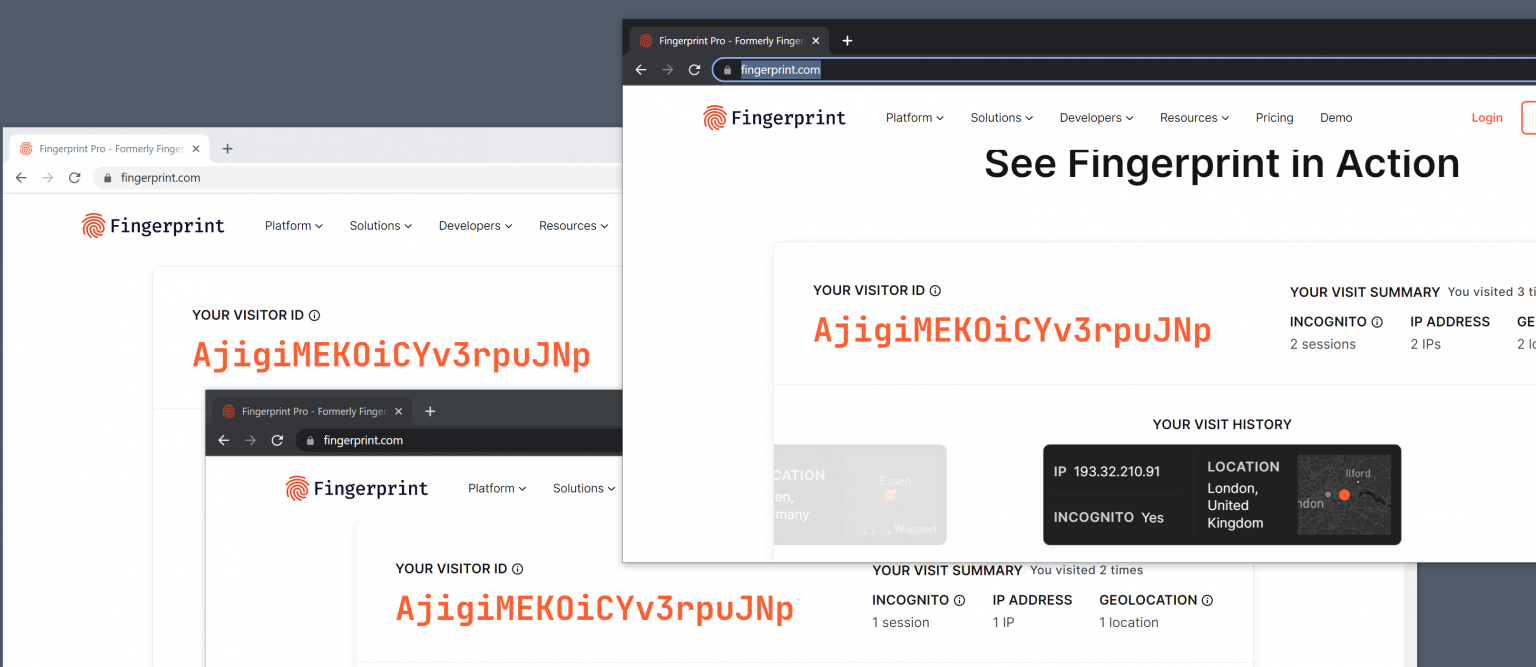
Web Fingerprinting gets frighteningly good: sees through VPNs and Incognito Mode

- Posted in Computers! by

This thread details has been added here as read in ghacks.

gHacks thread

Web Fingerprinting gets frighteningly good: sees through VPNs and Incognito Mode

Local tests done in several web browsers confirmed the accuracy. The website identified three visits using Firefox, Firefox with private browsing mode and Firefox with private browsing mode and a VPN connection, as coming from the same user.

How to protect against fingerprinting

Internet users have two main options when it comes to protections against fingerprinting-based tracking. Either use a browser with proper protections against these types of tracking, Tor Browser or Firefox with privacy.resistFingerprinting set to TRUE are two valid options, or use different web browsers for different tasks.

Extensions that block the execution of scripts on websites may also protect against fingerprinting. Browser users may check out NoScript for that, which may be configured to block scripts by default. The popular uBlock Origin extension may also be configured to block all JavaScript by default.

Local Tests

Rest in the gHacks post, in the URL above.

File sharing ZippyShare is planning a shut down my March end, 2023!

- Posted in Computers! by

Imagine!!

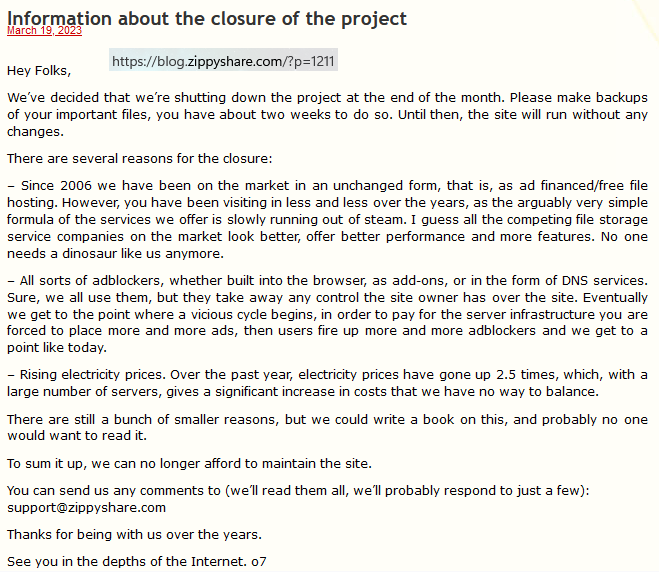
Just read through that ZippyShare is shutting down completely by the end of this month, and that they have asked users to backup the individual data. There is only a banner at the top of the site, but the following blog post makes it open as to why the reason to shut completely: https://blog.zippyshare.com/?p=1211

Banner Thread

Information about the closure of the project March 19, 2023

Hey Folks,

We’ve decided that we’re shutting down the project at the end of the month. Please make backups of your important files, you have about two weeks to do so. Until then, the site will run without any changes.

There are several reasons for the closure:

– Since 2006 we have been on the market in an unchanged form, that is, as ad financed/free file hosting. However, you have been visiting in less and less over the years, as the arguably very simple formula of the services we offer is slowly running out of steam. I guess all the competing file storage service companies on the market look better, offer better performance and more features. No one needs a dinosaur like us anymore.

– All sorts of adblockers, whether built into the browser, as add-ons, or in the form of DNS services. Sure, we all use them, but they take away any control the site owner has over the site. Eventually we get to the point where a vicious cycle begins, in order to pay for the server infrastructure you are forced to place more and more ads, then users fire up more and more adblockers and we get to a point like today.

– Rising electricity prices. Over the past year, electricity prices have gone up 2.5 times, which, with a large number of servers, gives a significant increase in costs that we have no way to balance.

There are still a bunch of smaller reasons, but we could write a book on this, and probably no one would want to read it.

To sum it up, we can no longer afford to maintain the site.

You can send us any comments to (we’ll read them all, we’ll probably respond to just a few): support@zippyshare.com

Thanks for being with us over the years.

See you in the depths of the Internet. o7

I have raised a ticket with them to see if I can buy it out, of course if my budget allows. Let us hope it is within my budget, as I really hate to see something like this go down for such a small reason.

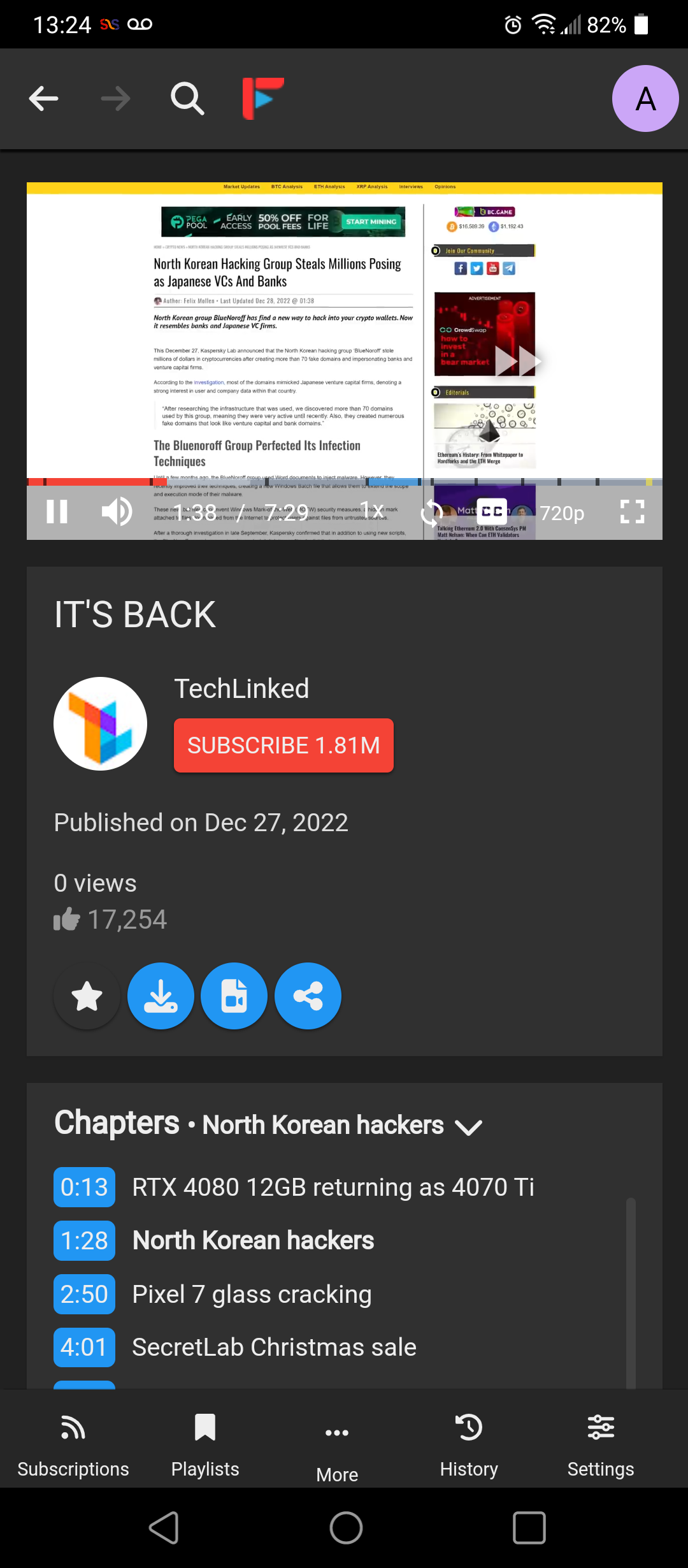
FreeTubeCordova - An open source YouTube player built with privacy in mind

- Posted in Android by

FreeTubeCordova - An open source YouTube player built with privacy in mind

io.freetubeapp.freetube | MarmadileManteater (Emma) | AGPL-3.0-or-later | 2023-01-23 / 0.18.0.98

Releases | Latest | Online-Website

FreeTube Cordova is a YouTube client that uses the Invidious API to serve data and videos from YouTube. No official YouTube APIs are used to obtain data. Your subscriptions and history are stored locally on your device and are never sent out.

Features:

Watch videos without ads
Use YouTube without Google tracking you using cookies and JavaScript
Organize your subscriptions into Profiles to create a more focused feed
Export and import subscriptions from a variety of sources (Ex: YouTube, NewPipe, Invidious)
Support for SponsorBlock
Support for Comments and Replies
Support for YouTube Chapters
Option to password protect settings
Parental controls
Subscribe to channels without an account

FreeTube Cordova is currently in Beta. While it should work well for most users, there are still bugs and missing features that need to be addressed.

Anti-Features:

ApplicationDebuggable: APK files of this application are compiled for debugging („application-debuggable“). 
NonFreeNet: This application promotes or entirely depends a non-Free network service.

Permissions:

BLUETOOTH
FOREGROUND_SERVICE
INTERNET
MODIFY_AUDIO_SETTINGS
READ_EXTERNAL_STORAGE
RECORD_AUDIO
WAKE_LOCK
WRITE_EXTERNAL_STORAGE

Libraries:

Android Support v4 (Development Framework)
AndroidX Activity (Utility)
Android Jetpack Annotations (Utility)
Arch (Utility)
AppCompat (Utility)
Asynclayoutinflater (UI Component)
Android Support Library collections (Utility)
Coordinatorlayout (UI Component)
Androidx Core (Utility)
AndroidX Cursor Adapter (Utility)
Android Support Library Custom View (UI Component)
Documentfile (UI Component)
Drawerlayout (UI Component)
AndroidX Fragment (UI Component)
Interpolator (UI Component)
androidx.legacy (Utility)
Lifecycle (Utility)
Loader (Utility)
AndroidX Local Broadcast Manager (Utility)
Media (Utility)
Print (Utility)
Android Activity Saved State (Utility)
Slidingpanelayout (UI Component)
Swiperefreshlayout (UI Component)
Tracing (Utility)
Vectordrawable (UI Component)
Android Jetpack VersionedParcelable (Utility)
Viewpager (UI Component)
Webkit (Utility)
Cordova Music Controls Plugin (UI Component)
CordovaClipboard (Utility)
Cordova Background Plugin (Utility)
Cordova plugin for theme detection (Utility)
Apache Cordova (Development Framework)
Webkit Boundary Interfaces (Utility)

Snapshots

snap01 snap02 snap03

Robocopy - Robust Command Line File-Folder Copy-Replace

- Posted in Computers! by

Robocopy Modified Logo

I am sure most windows users will not be knowing about ROBOCOPY, the windows command-line robust copy/replace command. Teracopy has been said to be using this functionality for ages, and windows has included it since before Windows NT 4.0, in different ways, and as a stable one since 4.0, in its resource pack.

Created by Kevin Allen and first released as part of the Windows NT 4.0 Resource Kit, it has been a standard feature of Windows since Windows Vista and Windows Server 2008. The command is robocopy.

The secret dirt is that Robocopy was first written by MS colleague Kevin Allen, and he started sharing copies around in 1994ish. From there, and after many iterations and heavy-duty real-world feedback, robocopy ended up in the Windows Resource Kit, and then later merged into the core Windows package. In the beginning, Kevin was a very experienced programmer, but new to the Win32 API; so robocopy was one of his projects to educate himself about Windows programming. Later on, ITG used robocopy to routinely transfer many gigabytes of data around MS global offices, every night; it became very robust and battle-hardened. It is a long time now since Kevin was involved in the robocopy source code at all; it is maintained by the Windows team.


Syntax

By default Robocopy will only copy a file if the source and destination have different time stamps or different file sizes.

Syntax

ROBOCOPY Source_folder Destination_folder [files_to_copy] [options]

Key

file(s)_to_copy : A list of files or a wildcard.
(defaults to copying *.*)

cmd

robocopy <source> <destination> [<file>[ ...]] [<options>]

For example, to copy a file named yearly-report.mov from c:reports to a file share marketingvideos while enabling multi-threading for higher performance (with the /mt parameter) and the ability to restart the transfer in case it's interrupted (with the /z parameter), type:

dos

robocopy c:reports 'marketingvideos' yearly-report.mov /mt /z

Features

Robocopy is noted for capabilities above and beyond the built-in Windows copy and xcopy commands, including the following, some requiring appropriate command-line options:

  • Ability to tolerate network interruptions and resume copy (incomplete files are marked with a date stamp of 1970-01-01 and contain a recovery record so Robocopy knows where to continue from).
  • Ability to skip NTFS junction points which can cause copying failures because of infinite loops (/XJ)
  • Ability to copy file data and attributes correctly, and to preserve original timestamps, as well as NTFS ACLs, owner information, and audit information using the /COPYALL or /COPY: command line switches.
  • Beginning with the XP026 version, the ability to copy folder (or directory) date and timestamps (/DCOPY:T), even with the ability to update folder timestamps (copied from existing folders) on folders already created from previous versions (that did not copy the folder date and timestamps).
  • Ability to assert the Windows NT "backup right" (/B) so an administrator may copy an entire directory, including files denied readability to the administrator.
  • Persistence by default, with a programmable number of automatic retries if a file cannot be copied.
  • A "mirror" mode, which keeps trees synchronised by also deleting files in the destination that are not present in the source.
  • Ability to skip files already in the destination folder with identical size and timestamp.
  • A continuously updated command-line progress indicator.
  • Ability to copy paths exceeding 259 characters — up to a theoretical limit of about 32,000 characters — without errors.
  • Multithreaded copying introduced with Windows 7 and Windows Server 2008 R2.
  • Return code on program termination for batch file usage.

Compression

Since Windows Server 2019 and Windows 10, a compression option is available in robocopy when copying across a network. With this switch, if the destination computer supports SMB compression and the files being copied are very compressible, there may be significant improvements to performance. The SMB compression adds inline whitespace compression to file transfers. Compression is also available with the xcopy command and Hyper-V Live Migration with SMB.


Examples of use

Here are some examples of usage, which is not case-sensitive. If more than one option is specified, they must be separated by spaces.

Copy directory contents of the source Directory A to the destination Directory B (including file data, attributes and timestamps), recursively with empty directories (/E):

Robocopy "C:Directory A" "C:Directory B" /E

If directory names have non-standard characters, such as spaces, they must be enclosed in double quotes, as is usual in the command line.

Copy directory recursively (/E), copy all file information (/COPYALL, equivalent to /COPY:DATSOU, D=Data, A=Attributes, T=Timestamps, S=Security=NTFS ACLs, O=Owner info, U=Auditing info), do not retry locked files (/R:0) (the number of retries on failed copies default value is 1 million), preserve original directories' Timestamps (/DCOPY:T - requires version XP026 or later):

Robocopy C:A C:B /COPYALL /E /R:0 /DCOPY:T

Mirror A to B, destroying any files in B that are not present in A (/MIR), copy files in resume mode (/Z) in case network connection is lost:

Robocopy C:A backupserverB /MIR /Z

I was able to gather a video guide courtesy of Adam Bertram from his thread.

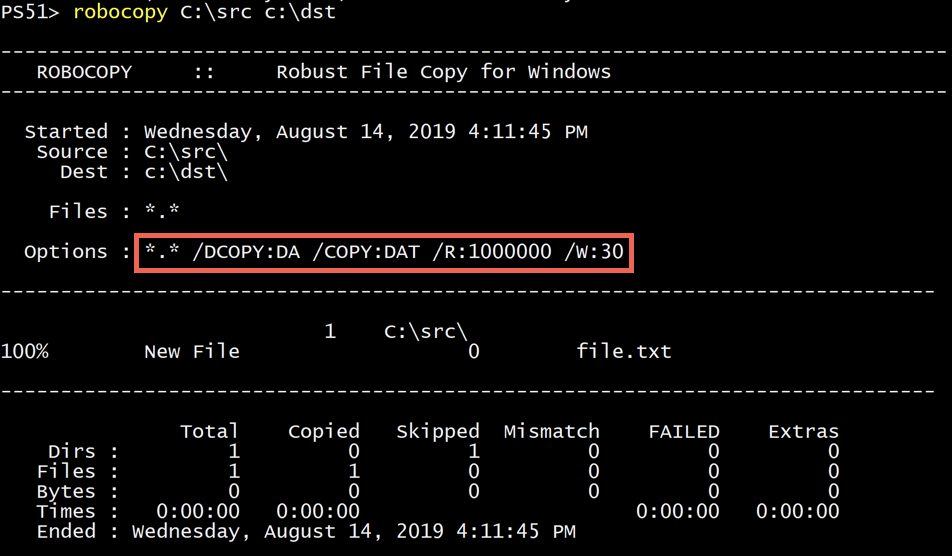
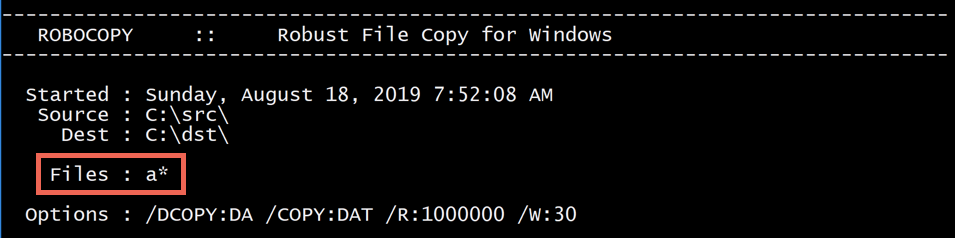
Few example images as well from his thread:

Example 01

Example 02

Example 03


For the full reference, see the Microsoft TechNet Robocopy page.

More information can be found at: SS64 Manpage | Wikipedia | Windows Docs